
python中logging用于记录日志,记录一下该模块的用法
logging日志级别分为6种,从低到高分别为NOTSET、DEBUG、INFO、WARNING、ERROR、CRITICAL,logging执行时会输出大于等于设置级别的信息。默认的设置级别是WARNING。
首先import logging
然后logging.basicConfig(filename=”xxx.log”, filemode=”w”, format=”%(asctime)s %(name)s:%(levelname)s:%(message)s”, datefmt=”%d-%M-%Y %H:%M:%S”, level=logging.DEBUG)
然后就可以在需要输出日志信息的地方加入下面的语句
logging.debug(‘This is a debug message’)
logging.info(‘This is an info message’)
logging.warning(‘This is a warning message’)
logging.error(‘This is an error message’)
logging.critical(‘This is a critical message’)
其中,format中的内容格式如下
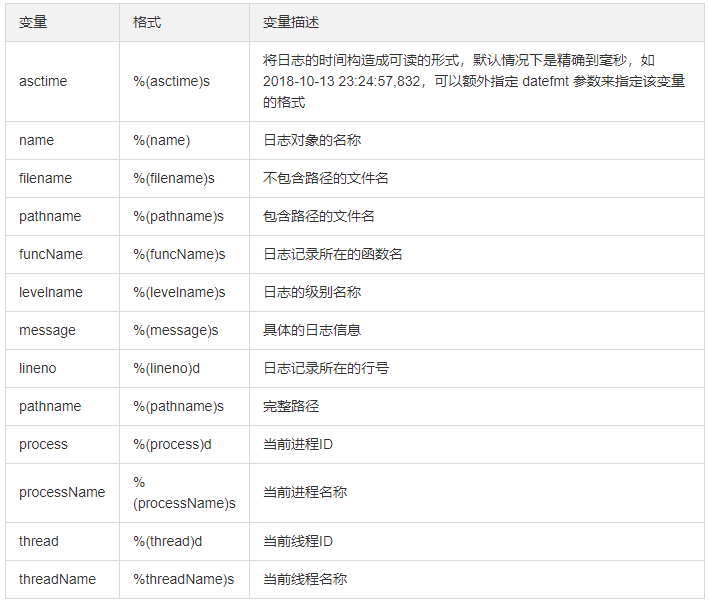
生成的日志文件xxx.log,内容如下:
19-11-18 21:10:32 root:DEBUG:This is a debug message
19-11-18 21:10:32 root:INFO:This is an info message
19-11-18 21:10:32 root:WARNING:This is a warning message
19-11-18 21:10:32 root:ERROR:This is an error message
19-11-18 21:10:32 root:CRITICAL:This is a critical message