
Python中logging的使用

python中logging用于记录日志,记录一下该模块的用法

logging日志级别分为6种,从低到高分别为NOTSET、DEBUG、INFO、WARNING、ERROR、CRITICAL,logging执行时会输出大于等于设置级别的信息。默认的设置级别是WARNING。

首先import logging
然后logging.basicConfig(filename=”xxx.log”, filemode=”w”, format=”%(asctime)s %(name)s:%(levelname)s:%(message)s”, datefmt=”%d-%M-%Y %H:%M:%S”, level=logging.DEBUG)
然后就可以在需要输出日志信息的地方加入下面的语句
logging.debug(‘This is a debug message’)
logging.info(‘This is an info message’)
logging.warning(‘This is a warning message’)
logging.error(‘This is an error message’)
logging.critical(‘This is a critical message’)

其中,format中的内容格式如下
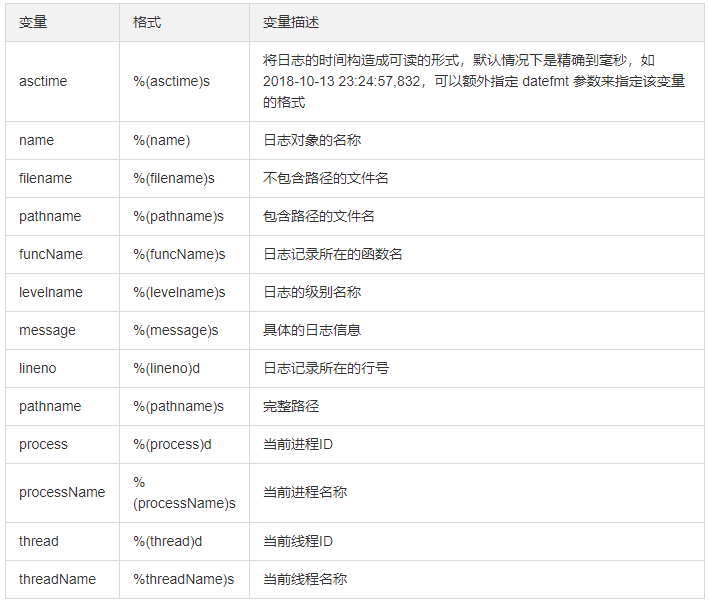
生成的日志文件xxx.log,内容如下:

19-11-18 21:10:32 root:DEBUG:This is a debug message
19-11-18 21:10:32 root:INFO:This is an info message
19-11-18 21:10:32 root:WARNING:This is a warning message
19-11-18 21:10:32 root:ERROR:This is an error message
19-11-18 21:10:32 root:CRITICAL:This is a critical message

摘抄自 https://cloud.tencent.com/developer/article/1354396

Python2和Python3中 / 的差异

今天用python2的时候,发现a=19/25,a竟然为0!搜了一下才知道python2中,一个整数被另一个整数除,结果只保留整数部分。类似python3中//的操作。想得到预期中的小数形式,可以将参与运算的其中一个数字变为小数。

>>>1.0/2
0.5

Python使用progressbar模块实现显示进度条功能

首先用pip安装progressbar。pip install progressbar

用法一

import time 
from progressbar import * 
total=1000 
def dosomework():
     time.sleep(0.01) 
progress =ProgressBar() 
for i in progress(range(1000)): 
    dosomework()

显示效果:

 5% |###                                                                      |
100% |######################################################################|

用法二

from __future__ import division
import sys, time
from progressbar import *
total=1000
def dosomework():
    time.sleep(0.01)
pbar = ProgressBar().start()
for i inrange(1000):
    pbar.update(int((i /(total -1)) *100))
    dosomework()
pbar.finish()

用法三

import time
from progressbar import *
total=1000
def dosomework():
    time.sleep(0.01)
widgets =['Progress: ',Percentage(), ' ', Bar('#'),' ', Timer(),' ', ETA(), ' ', FileTransferSpeed()]
pbar=ProgressBar(widgets=widgets, maxval=10*total).start()
for i inrange(total):
    pbar.update(10*i +1)
    dosomework()
pbar.finish()

显示效果:

Progress:   3% |###                                                                                | Elapsed Time: 0:00:15 ETA: 0:09:02 919.67  B/s
Progress: 100% |###################################################################################| Elapsed Time: 0:10:10 Time: 0:10:10 917.42  B/s

widgets可选参数含义:

‘Progress: ‘ :设置进度条前显示的文字
Percentage() :显示百分比
Bar(‘#’) : 设置进度条形状
ETA() : 显示预计剩余时间
Timer() :显示已用时间

在pycharm中使用时,需要在Run —>Edit Configurations里勾上Emulate terminal in output console

Python 中使用tqdm增加进度条

首先from tqdm import tqdm,然后在程序中即可使用for i in tqdm(iterator, desc=”description”): 这种形式增加进度条。desc参数为进度条前的说明。

from tqdm import tqdm

with open("xxxx.txt", "r") as file:
    for line in tqdm(file.readlines(), desc="processing"):
        pass #

上面的程序为处理一个文本并显示处理进度的示例。更多有关tqdm的内容参考: https://pypi.org/project/tqdm/

Python filter()函数

用于过滤序列,过滤掉不符合条件的元素。py2返回新列表,py3返回迭代器对象

filter(function, iterable)

接收两个参数,第一个为函数,第二个为可迭代对象,每个元素作为参数传递给函数进行判,然后返回 True 或 False

conda常用命令

查看conda环境

conda info -e

创建新的环境

conda create -n env_name

创建指定python版本的环境

conda create -n env_name python=x.x(2.7,3.5等)

移除环境

conda remove -n env_name –all

设置采用国内镜像

1、(临时方式)命令行conda config --add channels https://mirrors.tuna.tsinghua.edu.cn/anaconda/pkgs/free/conda config --set show_channel_urls yes

2、(永久方式)Windows下C://Users/username/.condarc,Linux/Mac下~/.condarc,没有可以创建,修改内容如下

channels:
 - https://mirrors.tuna.tsinghua.edu.cn/anaconda/pkgs/free/ 
 - defaults
show_channel_urls: yes